
So, you want to divest yourself from Amazon, and your favorite authors have started accommodating that desire. The only problem? You have a Kindle. Sure, you could get a new e-reader or read on your phone, but why spend that money or let the Kindle go to waste? Luckily, there’s a way to add books bought from nearly anywhere else to the Kindle. And it’s easy too!
The method that requires no interaction from Amazon does require a computer, either a desktop or laptop. There are other ways to get e-books on to your Kindle if you don’t have a computer, but all the ones I know still have Amazon involvement so I won’t discuss them here.
For this, you’ll need: a computer, your Kindle, a charging cable that fits your computer and does data, and the software Calibre. Download Calibre here. It works on Windows, Mac, and Linux.
Once you’ve got Calibre installed, you can begin importing books! Once you start it up the first time, you’ll be presented with a screen like this, just with fewer books.

Download your book. Once you’ve got it, you can either drag the file into the main area, where it lists the books, or you can press the “Add books” button and find it through there. It’ll be imported into the program with any data the e-book has on it, including the cover. Once it’s in, plug in your Kindle. Once it’s recognized, these two buttons will show up.
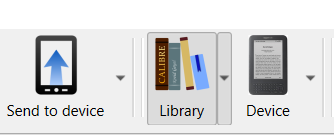
The “Device” button will change the main area from the books in your library to the books on your kindle. While you’re in the library, select the book(s) you’ve downloaded and press “Send to device”. It may take a few seconds, but it’ll send those books to the Kindle. Once it’s done, you can unplug the Kindle from the computer.
And that’s it! You’ve loaded a book on your Kindle, no Amazon required.
While you’re here, why not get one of my books to try sideloading on your Kindle? You can find them at my Ko-Fi shop. ASH is here. And Corrupted, Absolutely is here.

 Modern Authors